Step 2 of 5
Create a new Instagram account
Use the Gmail you prepared to create a new Instagram account dedicated to your target country. It’s important that a localized account is kept separate from your existing personal account.
Pathinstagram.com/accounts/emailsignupSign up with email
0 of 6 done
- 1
Open the sign-up page
In your browser, go to the Instagram email sign-up page. In the app, tap Create new account at the bottom of the login screen.
instagram.com/accounts/emailsignup - 2
Enter email, password and details
Enter your dedicated Gmail, then your password, birthday, name and username in order, and tap Submit. We recommend signing up with email rather than a phone number.
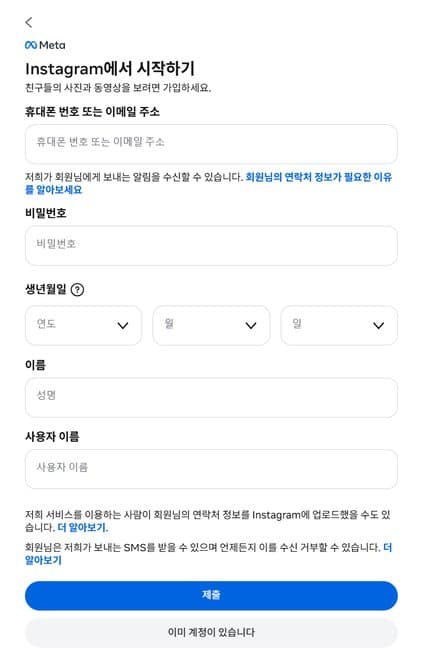
1Enter your dedicated Gmail2Tap Submit - 3
Verify your email
Enter the 6-digit confirmation code sent to your Gmail and tap Continue. If the code doesn’t arrive, you can resend it with “I didn’t get the code”.
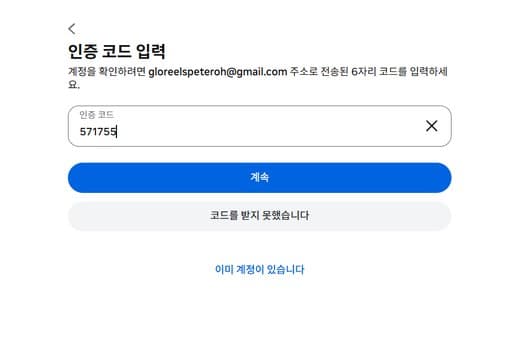
1Enter the 6-digit code2Tap Continue - 4
Choose a username
Pick a username that makes the target country and brand recognizable. Avoid your real name or handles your family knows; adding a country code makes it easier to manage.
e.g. yourbrand_jp / yourbrand.vn - 5
Set up your profile basics
Fill in your profile photo and bio in the language of your target country. Avoid overly personal photos (such as your own face) and set it up for your brand.
- 6
Agree to terms and policies → done
You need to agree to the required terms — terms of use, data collection, data sharing and so on — for the account to be created. Tap Agree to all, then finish with Agree.
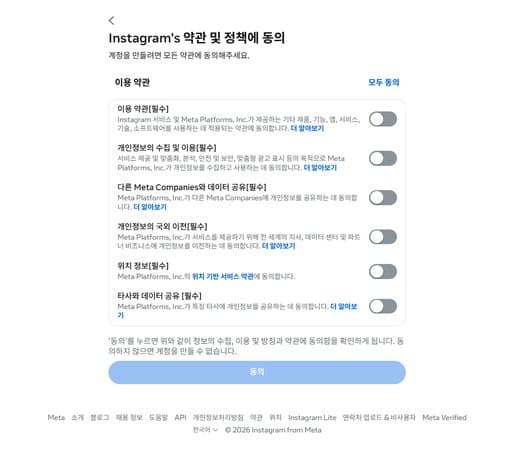
1Tap Agree to all2Tap Agree
Caution — to keep it separate from your personal account
- Don’t use “Log in with Facebook” when signing upYou may be connected to Facebook friends automatically
- Turn off contact syncing (address book upload)The account gets suggested to people you know
- Keep Facebook disconnected in Accounts Center
Once this account is active as your target-country account, just connect it in GloReels.